
Mastering Cross-Window Communication
Techniques, Security, and Performance Optimization for Modern Web Applications


Techniques, Security, and Performance Optimization for Modern Web Applications
1. Introduction
Overview of Cross-Window Communication
Cross-window communication refers to the ability of different browser windows, tabs, or frames to exchange information with each other. In web development, it’s common to have multiple browser contexts (like tabs, iframes, or windows) that need to work together or share data. For example, an application might open a new window for user authentication and then need to pass the authentication result back to the original window.
This type of communication is essential because, by default, browser contexts are isolated from each other to ensure security and prevent unwanted interference. However, in many cases, it’s necessary to break down these barriers under controlled and secure conditions to achieve seamless user experiences or to share data across different parts of an application.
Cross-window communication can be implemented using various methods, each with its own strengths, limitations, and security considerations. Understanding these methods is crucial for developers to build robust and secure web applications.
Importance and Use Cases
The ability to communicate between tabs, windows, or iframes is vital in modern web applications for several reasons:
Enhanced User Experience:
Consistent State Across Tabs: Users often open multiple tabs for the same application. For example, in a productivity suite, a user might have their email open in one tab and a document editor in another. By using cross-window communication, these tabs can share data, ensuring a consistent user experience. For instance, if a user changes their theme in one tab, this change can be reflected across all open tabs.
Real-Time Collaboration: In collaborative applications, such as Google Docs, multiple users can work on the same document simultaneously, often in different browser windows or tabs. Cross-window communication enables these real-time updates, allowing users to see changes made by others immediately.
2. Security and Authentication:
OAuth and Single Sign-On (SSO): Many authentication systems, such as OAuth, involve opening a new window or tab for the login process. Once the user authenticates, the result (e.g., an access token) needs to be passed back to the original window. Cross-window communication makes this process seamless and secure.
Session Management: Applications can use cross-window communication to synchronize session data across different tabs. If a user logs out in one tab, the other tabs can be notified and automatically log out the user, preventing unauthorized access.
3. Data Synchronization:
Shopping Carts: E-commerce websites often allow users to add items to their cart from different tabs. Cross-window communication ensures that all tabs reflect the current state of the cart, regardless of which tab was used to add or remove items.
Preference Synchronization: Users may set preferences (e.g., language or theme) in one tab, and expect these preferences to be applied across all open tabs without requiring a page refresh.
4. Content and Resource Sharing:
Advertisements and Analytics: Many websites use iframes to load ads or analytics scripts. These iframes need to communicate with the parent window to report clicks, views, or other user interactions. Cross-window communication facilitates this exchange of information.
Popup Windows: Some applications use popups for auxiliary functions, like displaying detailed information or handling file uploads. The data collected or generated in the popup needs to be sent back to the main application window.
5. Cross-Domain Communication:
Third-Party Integrations: Web applications often integrate with third-party services hosted on different domains. For example, embedding a YouTube video or a Twitter feed on a webpage involves communication between the embedding site and the service provider. Cross-window communication allows these interactions to occur smoothly and securely, even across different domains.
6. Complex Web Applications:
Modular Architecture: In large-scale web applications, different modules might be loaded into separate iframes or windows to keep the codebase organized and improve performance. These modules need to communicate to function as a cohesive application.
2. Cross-Window Communication Methods
Overview of Available Methods
Cross-window communication is essential for web applications where different browser contexts, like tabs, windows, or iframes, need to exchange data. There are several methods available to facilitate this communication, each with unique advantages, use cases, and security implications.
postMessageAPI:
Description: The
postMessageAPI is one of the most versatile and commonly used methods for cross-window communication. It allows windows to send messages to each other regardless of their origin (domain, protocol, or port). This API can be used for communication between an iframe and its parent window, or between two separate windows or tabs.How It Works:
A message is sent from one window to another using
window.postMessage(message, targetOrigin).The receiving window listens for the
messageevent using an event listener.The
targetOriginparameter is crucial for security, as it specifies the origin of the window that should receive the message, preventing potential data leaks to unintended recipients.Use Cases:
Communicating between iframes and parent windows.
Sending data between different browser windows or tabs.
Cross-domain messaging for embedded widgets, advertisements, or third-party services.
2. localStorage:
Description:
localStorageis a web storage mechanism that allows data to be stored in the browser and shared across all tabs and windows that originate from the same domain. Unlike session storage, which is limited to a single tab,localStoragepersists data across different sessions and tabs.How It Works:
Data is stored as key-value pairs using
localStorage.setItem(key, value).Other tabs or windows can access the stored data using
localStorage.getItem(key).To detect changes in
localStorage, tabs can listen for thestorageevent, which is fired whenever a change is made to the storage area.Use Cases:
Synchronizing application state across multiple tabs, such as user preferences or shopping cart contents.
Implementing a notification system where updates in one tab are reflected in another.
Storing data that needs to persist between page reloads and sessions.
3. Cookies:
Description: Cookies are small pieces of data stored on the client-side that are sent with every HTTP request to the server. They can also be accessed via JavaScript, allowing data sharing across different tabs and windows.
How It Works:
Cookies are set using
document.cookieand can include attributes such asexpires,path, anddomainto control their scope and lifespan.Other tabs or windows that share the same domain can access these cookies using
document.cookie.Unlike
localStorage, there is no event to detect changes in cookies, making it less efficient for real-time communication.Use Cases:
Managing session state across multiple tabs.
Persisting user authentication status.
Tracking user behavior across different tabs for analytics.
4. Broadcast Channel API:
Description: The Broadcast Channel API allows multiple browsing contexts (like different tabs, windows, or iframes) from the same origin to communicate with each other via a shared channel.
How It Works:
A broadcast channel is created using
new BroadcastChannel(channelName).Tabs or windows send messages using
channel.postMessage(message), and other contexts listen for these messages usingchannel.onmessage.Use Cases:
Real-time messaging across different tabs or windows.
Synchronizing state or data, like dark mode settings, across an entire application.
Broadcasting events or notifications to all open tabs.
5. SharedWorker:
Description: A SharedWorker is a type of web worker that can be accessed by multiple scripts running in different browsing contexts (like different tabs or iframes) as long as they belong to the same origin.
How It Works:
A SharedWorker is created using
new SharedWorker('worker.js').Different tabs or windows can communicate with the SharedWorker through
postMessage, allowing for shared logic or data handling.Use Cases:
Sharing complex data processing tasks between multiple tabs.
Implementing a centralized state or data store accessible by all tabs or windows.
Managing concurrent tasks that need to be synchronized across different contexts.
6. Service Workers and IndexedDB:
Description: Service Workers, primarily used for background tasks and offline capabilities, can also be leveraged for cross-window communication, often in conjunction with IndexedDB, a client-side storage system.
How It Works:
Service Workers can intercept network requests and manage cached data, but they can also be used to relay messages between different tabs via
postMessage.IndexedDB can be used as a persistent storage mechanism where different tabs can write and read data, effectively allowing communication.
Use Cases:
Background synchronization tasks that update all open tabs.
Sharing large datasets across different tabs without reloading.
Enhancing offline functionality by sharing data stored in IndexedDB.
Security Considerations
Security is a paramount concern in cross-window communication, as improper handling can lead to vulnerabilities like cross-site scripting (XSS), data leaks, or man-in-the-middle attacks. Below are some key security considerations for each method:
postMessageAPI:
Target Origin Validation: Always specify the
targetOriginparameter in thepostMessagemethod to ensure that the message is only sent to the intended recipient. Avoid using*as the target origin unless absolutely necessary, as it makes the message accessible to any domain.Message Validation: On the receiving end, always validate the origin of the message using
event.originand verify the structure and content of the message before processing it. This prevents malicious scripts from injecting harmful content.Avoid Sensitive Data: Do not use
postMessageto send sensitive information like authentication tokens, as it can be intercepted or misused if proper precautions are not taken.
2. localStorage:
Data Sensitivity: Avoid storing sensitive data in
localStoragebecause it is accessible from any script running on the same origin, making it vulnerable to XSS attacks.No Event-Based Access: Be aware that
localStoragedoes not provide real-time notifications across tabs, so it should not be relied upon for time-sensitive or critical updates.Storage Limit: Consider the storage limit of
localStorage(typically around 5MB per origin) when using it for cross-window communication, especially in applications handling large datasets.
3. Cookies:
Secure and HttpOnly Flags: Use the
Secureflag to ensure that cookies are only sent over HTTPS and theHttpOnlyflag to prevent access to cookies via JavaScript, reducing the risk of XSS attacks.SameSite Attribute: Leverage the
SameSiteattribute to restrict cross-site cookie usage, reducing the risk of cross-site request forgery (CSRF) attacks.Data Limitations: Be mindful of the size limitations of cookies (typically 4KB per cookie) and the potential impact on performance due to the transmission of cookies with every HTTP request.
4. Broadcast Channel API:
Origin Control: Since the Broadcast Channel API is limited to contexts from the same origin, it is inherently more secure for internal communications. However, ensure that sensitive data is still validated and handled carefully.
Access Control: Consider implementing custom access control mechanisms if different tabs or windows should not have equal access to all data sent over the channel.
5. SharedWorker:
Same-Origin Policy: SharedWorkers are bound by the same-origin policy, which restricts access to the same origin, adding a layer of security. However, as with other methods, be cautious with the data shared between contexts.
Resource Sharing: Ensure that SharedWorker tasks do not introduce race conditions or expose critical data to unauthorized tabs, particularly in complex applications.
6. Service Workers and IndexedDB:
Service Worker Scope: Carefully define the scope of your Service Worker to limit its access to specific parts of your application. This minimizes the risk of unauthorized access to resources.
Data Integrity: Implement mechanisms to ensure the integrity of data stored in IndexedDB, especially if it is being shared across different tabs. Validate data before reading or writing to prevent corruption or tampering.
By understanding these methods and their security implications, developers can make informed decisions about which approach to use for cross-window communication in their web applications, ensuring both functionality and security.
3. postMessage API
What is postMessage?
The postMessage API is a JavaScript method that allows different browsing contexts, such as windows, tabs, iframes, or even workers, to communicate with each other asynchronously. This API is particularly powerful because it enables communication between different origins (domains, ports, or protocols), making it an essential tool for scenarios like embedding third-party content, managing cross-domain data sharing, or syncing state across multiple tabs.
Introduced as part of the HTML5 specification, postMessage is widely supported across all modern browsers. Its primary function is to safely send messages from one window or iframe to another, without violating the browser's same-origin policy, which typically restricts such interactions to enhance security.
How postMessage Works
The postMessage API operates on a simple model of sending and receiving messages. The process involves two key components:
Sending a Message:
A window, iframe, or worker sends a message to another using the
postMessagemethod.The message can be any serializable object, such as strings, numbers, arrays, or objects.
The sender specifies the target origin, which determines where the message should be delivered. This is crucial for security, ensuring that the message is only received by a trusted destination.
2. Receiving a Message:
The target window or iframe listens for the
messageevent, which is triggered when a message is received.The event handler can then access the message data, origin of the message, and the source of the message (i.e., the window or iframe that sent it).
The receiver can then process the message accordingly, possibly responding back or updating the UI.
Sending Messages Between Windows or Iframes
To send a message using the postMessage API, you use the postMessage method available on the Window object. Here's how it works:
// Sending a message to another window or iframe
const targetWindow = window.open('https://example.com'); // or use a reference to an iframe
const message = { type: 'greeting', text: 'Hello from the sender window!' };
const targetOrigin = 'https://example.com';

targetWindow.postMessage(message, targetOrigin);targetWindow: A reference to the window or iframe that will receive the message. This can be obtained usingwindow.open(),document.getElementById('iframe').contentWindow, or similar methods.message: The data you want to send. This can be any serializable object, but it is common to use objects or strings.targetOrigin: A string specifying the expected origin of the receiving window. This is a security feature that ensures the message is only sent to the specified origin. If you want to send the message to any origin, you can use'*', but this is not recommended for security reasons.
Handling Received Messages
To handle a message on the receiving end, you need to listen for the message event. Here’s an example:
window.addEventListener('message', (event) => {
    // Check the origin of the message to ensure it's from a trusted source
    if (event.origin !== 'https://example.com') {
        console.warn('Received message from an untrusted origin:', event.origin);
        return;
    }

    // Process the message data
    const message = event.data;
    console.log('Received message:', message);

    // Example: Respond back to the sender
    event.source.postMessage({ type: 'response', text: 'Message received!' }, event.origin);
});event.origin: This property contains the origin of the window that sent the message. It's crucial to validate this to ensure you're only accepting messages from trusted sources.event.data: This property holds the data that was sent. You can then process this data based on the type of message received.event.source: A reference to the window or iframe that sent the message. This allows for bidirectional communication if needed.
Use Cases and Best Practices
The postMessage API is used in a variety of scenarios, and following best practices ensures secure and efficient communication:
Use Cases:
Cross-Domain Embedding:
Websites often embed third-party content, such as social media widgets, ads, or videos, within iframes. These iframes need to communicate with the parent window for tasks like resizing, sending analytics, or handling user interactions.
2. Single Sign-On (SSO):
Authentication flows, particularly OAuth, often require opening a new window or iframe. Once the user is authenticated, the result (e.g., an access token) is sent back to the original application window using
postMessage.
3. Real-Time Collaboration:
Applications like online editors or project management tools allow users to open the same document in multiple tabs.
postMessageenables synchronization of changes across these tabs, ensuring that all users see the most up-to-date content.
4. Popup Windows:
Some applications use popup windows for tasks like uploading files or making payments. These popups need to send data back to the main application window, which can be achieved using
postMessage.
Best Practices:
Always Validate
targetOrigin:
When sending a message, explicitly specify the
targetOriginparameter to restrict where the message can be sent. Avoid using'*'unless absolutely necessary.
2. Validate Message Origin:
On the receiving end, always check the
event.originproperty to verify that the message comes from a trusted source. This prevents unauthorized scripts from injecting malicious data.
3. Structure Your Messages:
Use consistent and structured data formats for your messages, such as JSON objects with a
typefield. This makes it easier to handle different types of messages and maintain the code.const message = { type: 'actionType', payload: { key: 'value' } };
4. Avoid Sending Sensitive Data:
Do not use
postMessageto send sensitive data such as authentication tokens or personal information, unless absolutely necessary and securely encrypted. Instead, consider using other secure communication channels or encrypting the data before sending.
5. Handle Errors Gracefully:
Implement error handling in both sending and receiving contexts to deal with unexpected scenarios, such as messages not being received or handled incorrectly.
Security Concerns
While postMessage is a powerful tool, it comes with security risks that need to be carefully managed:
Cross-Site Scripting (XSS):
If a malicious script gains access to the
postMessageAPI, it can send unauthorized messages or intercept messages meant for other parts of the application. Always validate theoriginand sanitize the message data to mitigate this risk.
2. Man-in-the-Middle Attacks:
If you use
'*'as thetargetOrigin, any website can receive the message, which opens up the possibility of man-in-the-middle attacks. Only specify trusted origins to prevent this.
3. Data Leakage:
Messages can potentially contain sensitive information. If these messages are intercepted or received by an unauthorized party, it can lead to data breaches. Ensure that messages are encrypted if they contain sensitive data.
4. Denial of Service (DoS):
A malicious site could flood the
postMessageAPI with messages, causing the receiving application to become unresponsive or overwhelmed. Implement rate limiting or throttling mechanisms to protect against this.
4. Using localStorage for Communication
localStorage is a web storage mechanism provided by browsers that allows websites to store key-value pairs in a persistent manner. Unlike cookies, localStorage data is not sent to the server with every HTTP request and is accessible across all tabs and windows that share the same origin. This makes localStorage a useful tool for cross-tab or cross-window communication in certain scenarios.
How localStorage Works Across Tabs
localStorage operates as a persistent storage solution within the browser, scoped to the domain (or origin) from which it was created. Here's how it works:
Scope and Persistence:
localStorageis accessible across all tabs, windows, or iframes that share the same domain, protocol, and port.The data stored in
localStoragepersists even after the browser is closed and reopened, unlikesessionStorage, which only lasts for the duration of a page session.Each domain has its own separate
localStoragespace, meaning data stored for one domain cannot be accessed by another domain, adhering to the same-origin policy.Basic Operations:
Setting a value:
localStorage.setItem('key', 'value');Getting a value:
localStorage.getItem('key');Removing a value:
localStorage.removeItem('key');Clearing all values:
localStorage.clear();
Because localStorage is shared across tabs and windows of the same origin, it can be used as a simple communication channel between them.
Implementing Communication via localStorage
To implement communication between tabs using localStorage, the general idea is to write data to localStorage in one tab and listen for changes in another tab. The key feature that facilitates this communication is the storage event.
Step 1: Writing Data to localStorage When an event occurs that you want to share with other tabs, you can store the event data in localStorage. For example:
// Writing data to localStorage in Tab 1
localStorage.setItem('sharedData', JSON.stringify({ action: 'update', data: 'newValue' }));
Step 2: Listening for Changes in Other Tabs In the other tabs, you can listen for the storage event, which is fired whenever localStorage is modified in another tab:
// Listening for changes in localStorage in Tab 2
window.addEventListener('storage', (event) => {
    if (event.key === 'sharedData') {
        const sharedData = JSON.parse(event.newValue);
        console.log('Received data from another tab:', sharedData);

        // Handle the received data accordingly
        if (sharedData.action === 'update') {
            // Update the UI or perform other actions
        }
    }
});
The
storageevent:The
storageevent is triggered on all other windows, tabs, or iframes when a change is made tolocalStoragein one window or tab.The event provides properties like
event.key,event.oldValue, andevent.newValue, which you can use to determine what changed.
Step 3: Clearing Communication Data It’s often a good practice to remove the data from localStorage once it has been processed, especially if it’s meant to be a transient message:
// Optionally clear the data after it has been processed
localStorage.removeItem('sharedData');
Limitations and Pitfalls
While localStorage is a convenient method for communication between tabs, it comes with several limitations and potential pitfalls:
Limited Storage Capacity:
localStoragetypically has a storage limit of around 5-10 MB per domain, depending on the browser. This makes it unsuitable for storing large amounts of data or frequent, large updates.
2. No Real-Time Communication:
The
storageevent is fired only whenlocalStorageis modified in a different tab. This means that if both tabs modify the storage at the same time, synchronization issues might arise.localStorageis not designed for real-time communication and can result in race conditions or data overwrites.
3. No Cross-Domain Communication:
localStorageis strictly limited to the same origin, meaning it cannot be used to communicate across different domains, even if they are related (e.g., subdomains).
4. Security Concerns:
Data stored in
localStorageis accessible by any JavaScript running on the same domain, which includes third-party scripts. Sensitive data should never be stored inlocalStoragewithout proper encryption.
5. Performance Considerations:
While
localStorageis generally fast, it may become a performance bottleneck if used for frequent, large data writes, especially in environments with heavy browser usage or multiple active tabs.
6. Potential for Data Overwrites:
Since
localStorageis shared across all tabs, there's a risk that one tab could overwrite the data stored by another tab, leading to potential inconsistencies or lost data.
7. Synchronization Issues:
The asynchronous nature of the
storageevent means that there might be delays in tabs receiving updates, leading to a less seamless user experience compared to other real-time communication methods.
Use Cases
Despite its limitations, localStorage is well-suited for certain use cases where persistent, cross-tab communication is required:
State Synchronization:
Synchronize application state across multiple tabs. For example, a user might toggle a dark mode setting in one tab, and you can use
localStorageto apply this change across all open tabs.Example:
// Tab 1: Update theme preference
     localStorage.setItem('theme', 'dark');

     // Tab 2: Listen for theme changes
     window.addEventListener('storage', (event) => {
         if (event.key === 'theme') {
             document.body.className = event.newValue;
         }
     });
2. Session Management:
Use
localStorageto share session-related data, like user authentication status, across multiple tabs. If a user logs out in one tab, other tabs can detect this change and redirect to a login page or clear session data.Example:
// Tab 1: User logs out
     localStorage.setItem('sessionStatus', 'loggedOut');

// Tab 2: Detect logout and redirect
     window.addEventListener('storage', (event) => {
         if (event.key === 'sessionStatus' && event.newValue === 'loggedOut') {
             window.location.href = '/login';
         }
     });
3. Notifications and Alerts:
Broadcast notifications or alerts to all open tabs of the same application. For instance, if a critical update is available or if the user has performed an action in one tab that requires acknowledgment in others,
localStoragecan be used to trigger alerts.Example:
// Tab 1: Notify all tabs of a critical update
     localStorage.setItem('notification', 'New update available!');

// Tab 2: Display notification
     window.addEventListener('storage', (event) => {
         if (event.key === 'notification') {
             alert(event.newValue);
         }
     });
4. Cross-Tab Data Sharing:
Share data between tabs for tasks like syncing form input values, tracking user interactions across different tabs, or maintaining a unified state.
Example:
// Tab 1: Save form input to localStorage
     localStorage.setItem('formData', JSON.stringify({ name: 'John Doe', email: 'john@example.com' }));

// Tab 2: Retrieve and populate form with data from localStorage
     const formData = JSON.parse(localStorage.getItem('formData'));
     document.querySelector('#name').value = formData.name;
     document.querySelector('#email').value = formData.email;
In summary, localStorage provides a simple and persistent mechanism for cross-tab communication in web applications. While it is not suitable for all scenarios, particularly those requiring real-time communication or handling sensitive data, it can be effectively used in use cases like state synchronization, session management, and simple data sharing across tabs. However, developers should be mindful of its limitations and security implications when integrating it into their applications.
5. Other Communication Methods
In addition to postMessage and localStorage, there are several other methods available for cross-window or cross-tab communication in web applications. Each method has its own strengths, weaknesses, and suitable use cases. Here, we'll explore Cookies, the SharedWorker API, the Broadcast Channel API, Service Workers, and IndexedDB, and then provide a comparison of these methods.
Cookies
Overview:
Cookies are small pieces of data stored on the client-side that are sent with every HTTP request to the server. They are traditionally used for session management, tracking, and storing user preferences.
Cookies can also be accessed via JavaScript, making them a potential tool for cross-tab communication within the same domain.
How Cookies Work for Communication:
Cookies are set using
document.cookieand can be retrieved or modified by any script running on the same domain.However, cookies have limitations in terms of size (typically 4KB per cookie) and do not trigger any events when they change, making them less suitable for real-time communication.
Implementation Example:
// Setting a cookie
document.cookie = "sharedData=Hello; path=/";

// Reading a cookie
const getCookie = (name) => {
    const value = `; ${document.cookie}`;
    const parts = value.split(`; ${name}=`);
    if (parts.length === 2) return parts.pop().split(';').shift();
};

// Example usage
const sharedData = getCookie('sharedData');
console.log('Shared data:', sharedData);
Limitations:
No real-time event triggering: Unlike
localStorage, there is no event that fires when a cookie is changed, so other tabs or windows will not automatically know when a cookie's value has been updated.Size limitation: The small size limit restricts the amount of data that can be communicated.
Performance impact: Cookies are sent with every HTTP request, which can slow down network communication if overused.
Use Cases:
Managing session state across tabs.
Persisting user preferences across sessions.
Simple cross-tab communication in legacy applications.
SharedWorker API
Overview:
SharedWorkers are a type of Web Worker that can be accessed by multiple browsing contexts (tabs, windows, iframes) from the same origin. Unlike regular workers, which are tied to a single browsing context, SharedWorkers allow for shared processing and data across different contexts.
How SharedWorker API Works:
A SharedWorker is created using
new SharedWorker('worker.js').Each tab or window can connect to the SharedWorker using
worker.port, allowing communication between different contexts through message passing.
Implementation Example:
Worker Script (
worker.js):
self.addEventListener('connect', (event) => {
       const port = event.ports[0];

       port.addEventListener('message', (e) => {
           // Broadcast message to all connected clients
           ports.forEach(p => p.postMessage(e.data));
       });

       port.start(); // Start the port to begin communication
       ports.push(port); // Keep track of connected clients
   });

   const ports = []; // Store connected ports
2. Main Page Script:
const worker = new SharedWorker('worker.js');
   worker.port.start();

   worker.port.addEventListener('message', (event) => {
       console.log('Message from another tab:', event.data);
   });

   // Sending a message to the worker
   worker.port.postMessage('Hello from Tab 1');
Limitations:
Same-origin only: SharedWorkers are restricted to the same origin, limiting cross-origin communication.
Complexity: The setup and usage of SharedWorkers are more complex compared to simpler methods like
localStorageorpostMessage.Performance: SharedWorkers can consume more resources, especially if many tabs or windows are connected and sending data frequently.
Use Cases:
Shared data processing tasks across multiple tabs (e.g., maintaining a shared state or performing background computations).
Implementing a centralized state store for complex applications.
Real-time synchronization of data or events across different tabs.
Broadcast Channel API
Overview:
The Broadcast Channel API allows communication between different browsing contexts (tabs, windows, iframes) that share the same origin. It provides a simple way to broadcast messages across all contexts that are connected to the same channel.
How Broadcast Channel API Works:
A broadcast channel is created using
new BroadcastChannel(channelName).Tabs or windows can send messages using
channel.postMessage(message), and listen for messages usingchannel.onmessage.
Implementation Example:
// Creating a broadcast channel
const channel = new BroadcastChannel('my_channel');

// Listening for messages
channel.onmessage = (event) => {
    console.log('Received message:', event.data);
};

// Sending a message
channel.postMessage('Hello from another tab!');
Limitations:
Same-origin only: The Broadcast Channel API is restricted to the same origin, so it cannot be used for cross-origin communication.
Volatility: The data sent via the Broadcast Channel is transient and is not stored, meaning that if a tab is not open or connected when a message is sent, it will not receive that message later.
Use Cases:
Real-time messaging and synchronization between tabs, such as updating UI elements or sharing notifications.
Broadcasting events, like user actions or application state changes, across multiple tabs.
Coordinating tasks or states in applications with multiple open tabs or windows.
Service Workers and IndexedDB
Overview:
Service Workers are scripts that run in the background of a web application, enabling features like push notifications, background sync, and offline support. Service Workers can also be used for communication between different tabs and for managing shared resources.
IndexedDB is a low-level API for storing large amounts of structured data on the client-side. It provides a way for different tabs to read and write data to a common database.
How Service Workers and IndexedDB Work Together:
Service Workers can act as intermediaries between different tabs, facilitating communication by using IndexedDB to store and retrieve data that needs to be shared.
A Service Worker can intercept network requests, cache data, and use IndexedDB to persist data across sessions.
Implementation Example:
Service Worker (sw.js):
self.addEventListener('message', (event) => {
       const { action, data } = event.data;

       if (action === 'saveData') {
           // Save data to IndexedDB
           saveToIndexedDB(data);
       }

       if (action === 'fetchData') {
           // Fetch data from IndexedDB and send it back to the client
           fetchFromIndexedDB().then(data => {
               event.source.postMessage({ action: 'dataResponse', data });
           });
       }
   });

   // Function to save data to IndexedDB
   function saveToIndexedDB(data) {
       // Implementation for saving data
   }

   // Function to fetch data from IndexedDB
   function fetchFromIndexedDB() {
       // Implementation for fetching data
       return Promise.resolve({ key: 'value' });
   }
2. Main Page Script:
navigator.serviceWorker.ready.then(registration => {
       registration.active.postMessage({ action: 'fetchData' });

       navigator.serviceWorker.addEventListener('message', (event) => {
           if (event.data.action === 'dataResponse') {
               console.log('Data from Service Worker:', event.data.data);
           }
       });
   });
Limitations:
Complexity: Implementing communication via Service Workers and IndexedDB requires more setup and is more complex than using simpler APIs like
postMessageorlocalStorage.Browser support: While modern browsers support Service Workers and IndexedDB, there may be limitations or differences in implementation across older browsers.
Data synchronization: IndexedDB operations are asynchronous, which can introduce delays in data synchronization across tabs.
Use Cases:
Offline support and background synchronization for web applications, where data needs to be shared and synchronized across multiple tabs.
Managing complex state or data that needs to persist across sessions, especially in progressive web apps (PWAs).
Coordinating tasks or events in applications that require background processing or data caching.
Comparison of Methods
Here’s a comparison of the different cross-window communication methods based on key criteria:
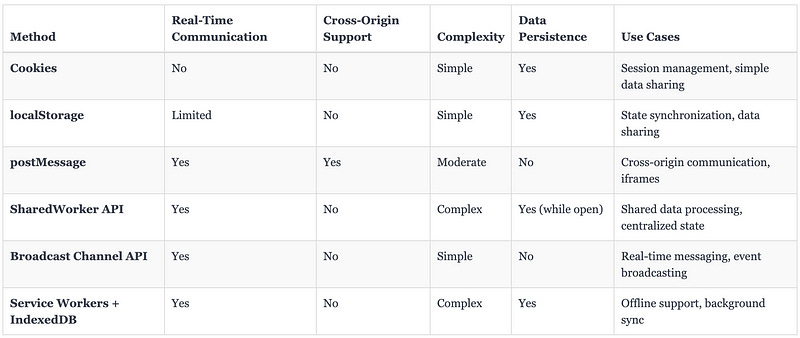
Real-Time Communication: Methods like
postMessage, SharedWorker API, and Broadcast Channel API offer real-time communication, making them suitable for scenarios where immediate updates are required.Cross-Origin Support:
postMessageis the only method that supports cross-origin communication, which is essential for integrating third-party content or services.Complexity: Simpler methods like Cookies and
localStorageare easier to implement but come with limitations in functionality. More complex methods like SharedWorkers and Service Workers offer advanced features but require more setup and understanding.Data Persistence:
localStorage, Cookies, and IndexedDB offer data persistence, making them suitable for scenarios where data needs to be stored across sessions. In contrast, methods like the Broadcast Channel API do not persist data and are better suited for transient messaging.
6. Common Challenges and Troubleshooting
Cross-window communication is a powerful feature in web development, enabling interaction between different tabs, windows, or iframes. However, it also comes with its own set of challenges and potential issues. Understanding how to debug and handle these challenges is crucial for ensuring reliable communication across your web applications.
Debugging Cross-Window Communication
Debugging cross-window communication can be complex due to the involvement of multiple contexts and the asynchronous nature of communication methods. Here are some strategies and tools to help you effectively debug these issues:
Console Logging:
Use Console Logs Extensively: Place
console.logstatements in both the sending and receiving contexts to track the flow of messages. This helps in verifying whether messages are being sent and received correctly.Include Context Information: When logging messages, include information about the origin, message type, and any relevant data. This makes it easier to identify issues related to specific messages.
console.log('Sending message:', message, 'to origin:', targetOrigin);
console.log('Received message:', event.data, 'from origin:', event.origin);
2. Browser Developer Tools:
Network Tab: Use the Network tab in browser developer tools to monitor HTTP requests and responses. This is particularly useful when debugging cookies or server-side communication that affects cross-window communication.
Application Tab: The Application tab in Chrome DevTools allows you to inspect
localStorage, cookies, and other storage mechanisms. This is helpful for verifying that data is being correctly stored and retrieved.Debugger: Set breakpoints in the code where messages are sent or received. This allows you to step through the code and observe how messages are handled in real-time.
3. Handling Asynchronous Issues:
Check for Timing Issues: Since cross-window communication is often asynchronous, messages may not be received in the order they are sent, or they may be delayed. Use event listeners and callbacks to ensure that your application can handle messages as they arrive.
Use Promises or Async/Await: If your communication logic involves asynchronous operations, consider using Promises or
async/awaitto manage the flow of data more effectively and reduce the risk of race conditions.
4. Testing Across Multiple Windows or Tabs:
Simulate Multiple Contexts: To accurately test cross-window communication, you may need to open multiple tabs or windows manually or use tools like Selenium or Puppeteer for automated testing.
BrowserSync or Similar Tools: Consider using tools like BrowserSync to synchronize interactions across multiple tabs or devices, which can help in testing and debugging communication-related issues.
5. Validating Security Considerations:
Check Origins: Always validate the origin of messages to ensure they are coming from trusted sources. This can prevent security vulnerabilities like cross-site scripting (XSS) or cross-site request forgery (CSRF).
Monitor
targetOriginUsage: Ensure that you are correctly specifyingtargetOrigininpostMessagecalls to prevent messages from being intercepted by malicious sites.
Handling Edge Cases and Browser Compatibility Issues
Different browsers and browser versions may handle cross-window communication methods differently, leading to edge cases or compatibility issues. Here’s how to address these challenges:
Browser Compatibility:
Check Browser Support: Not all communication methods are supported equally across browsers. Use resources like MDN Web Docs to check browser compatibility for features like
postMessage,localStorage,Broadcast Channel API, etc.Polyfills and Fallbacks: For older browsers that do not support certain features, consider using polyfills or providing alternative methods for communication. For example, if the Broadcast Channel API is not supported, you might fall back to using
localStoragewith event listeners.
2. Edge Cases with postMessage:
Cross-Domain Communication: When using
postMessagefor cross-origin communication, ensure that both the sending and receiving windows are correctly handling theoriginandtargetOriginparameters. Browsers may handle these differently, leading to inconsistent behavior.Handling Message Types: If your application handles multiple types of messages, make sure to differentiate them clearly (e.g., using a
typeproperty in the message object) and handle them appropriately in the receiving context.Iframe Security Restrictions: Some browsers impose stricter security measures on iframes, especially those loaded from different origins. Ensure that the iframe’s
sandboxattribute is configured correctly and that communication is allowed by both the parent and child contexts.
3. Issues with localStorage:
Storage Limits: Different browsers may have different limits for
localStorage(usually around 5MB). Be mindful of these limits, especially when storing larger datasets, and handleQuotaExceededErrorgracefully.Synchronous Access: While
localStorageis synchronous, it’s important to avoid locking the main thread, especially in scenarios where data is being read or written frequently. Consider using asynchronous alternatives like IndexedDB for larger or more complex data needs.Data Persistence Issues: In some browsers, particularly mobile browsers,
localStoragedata might be cleared more aggressively to free up space. Be aware of this and implement fallback mechanisms if necessary.
4. SharedWorker and Service Worker Considerations:
Service Worker Scope and Life Cycle: Service Workers have a defined scope and life cycle that may differ across browsers. Ensure that your Service Worker is correctly registered and that its scope covers the required pages.
SharedWorker Connectivity: Not all browsers fully support SharedWorkers, and there may be differences in how they handle connections and message passing. Test your implementation across different browsers to ensure consistent behavior.
Fallbacks for Unsupported Features: For browsers that do not support SharedWorkers or Service Workers, provide alternative methods of communication, such as using
localStorageorpostMessage.
5. Handling Session and State Synchronization:
Race Conditions: When synchronizing session data or state across multiple tabs, race conditions can occur if multiple tabs try to update the same data simultaneously. Implement mechanisms like mutexes (mutual exclusion) or use a centralized state management system to avoid conflicts.
Session Timeout Handling: Ensure that your application gracefully handles session timeouts across tabs. If a user’s session expires in one tab, other tabs should detect this and log the user out or prompt them to re-authenticate.
6. Testing on Multiple Devices:
Cross-Device Testing: When implementing cross-window communication, it’s important to test how your application behaves on different devices (e.g., desktops, tablets, and smartphones) and across different network conditions (e.g., slow or intermittent connections).
Responsive Design Considerations: Ensure that your cross-window communication logic works seamlessly with your application’s responsive design, especially when dealing with different screen sizes and orientations.
7. Error Handling and Graceful Degradation:
Robust Error Handling: Implement robust error handling throughout your cross-window communication logic. For example, if a message is not received or if there’s an issue with accessing
localStorage, your application should handle these scenarios gracefully without crashing.Graceful Degradation: If a particular communication method is not supported in a user’s browser, your application should degrade gracefully, offering limited functionality or alternative methods to achieve similar outcomes.
By anticipating and addressing these common challenges, you can build more robust and reliable cross-window communication into your web applications. This not only improves the user experience but also ensures compatibility across different browsers and devices, making your application more resilient and user-friendly.
7. Security Best Practices
When implementing cross-window communication in web applications, security is a critical concern. Poorly secured communication channels can expose your application to a range of vulnerabilities, including cross-site scripting (XSS), data breaches, and man-in-the-middle attacks. This section covers security best practices for preventing XSS, ensuring secure messaging, and handling sensitive data.
Preventing Cross-Site Scripting (XSS)
Overview of XSS: Cross-Site Scripting (XSS) is a type of security vulnerability that allows attackers to inject malicious scripts into web pages viewed by other users. If an attacker can inject JavaScript into your web application, they can potentially intercept cross-window communication, steal sensitive data, or perform other malicious actions.
Best Practices for Preventing XSS:
Input Validation and Sanitization:
Validate User Input: Always validate and sanitize input on both the client-side and server-side. Ensure that any data passed between windows, tabs, or iframes is properly validated before being used.
Escape Output: When displaying data in the DOM, escape any user-generated content to prevent it from being interpreted as executable code. Use functions like
encodeURIComponent()or template literals with proper escaping.Use Security Libraries: Leverage security libraries or frameworks that provide built-in XSS protection, such as Content Security Policy (CSP), to prevent malicious scripts from being executed.
2. Content Security Policy (CSP):
Implement CSP: Content Security Policy is an HTTP header that helps prevent XSS attacks by restricting the sources from which content can be loaded. For example, you can use CSP to allow scripts only from your domain and block inline scripts or scripts from untrusted sources.
Example CSP Header:
Content-Security-Policy: default-src 'self'; script-src 'self'; object-src 'none'; frame-ancestors 'self';Use
nonceAttributes: For cases where inline scripts are necessary, use anonce(a unique value generated for each request) to allow only specific inline scripts to run, further reducing the risk of XSS.
3. Secure Handling of postMessage:
Validate the Origin: Always check the
event.originproperty when receiving messages viapostMessage. Only accept messages from trusted origins and discard others.
window.addEventListener('message', (event) => {
         if (event.origin !== 'https://trusted-origin.com') {
             console.warn('Untrusted message origin:', event.origin);
             return;
         }
         // Handle the message securely
     });
Avoid Using
*intargetOrigin: When sending messages withpostMessage, avoid using'*'as thetargetOrigin. Instead, specify the exact origin to ensure the message is only received by the intended recipient.
4. Avoid Inserting Untrusted Scripts:
Never Trust Third-Party Content: Be cautious when embedding third-party content or allowing user-generated scripts. Use sandboxed iframes or Content Security Policy to limit the potential impact of third-party code.
Subresource Integrity (SRI): When including external scripts or stylesheets, use Subresource Integrity (SRI) to ensure that the resource has not been tampered with. SRI allows you to specify a hash that the resource must match to be loaded.
<script src="https://example.com/script.js" integrity="sha384-oqVuAfXRKap7fdgcCY5uykM6+R9GqQ8K/uxv8lzzTs2bP3XxhS5l8Xow5n/aVf7i" crossorigin="anonymous"></script>Secure Messaging Strategies
Best Practices for Secure Messaging:
Message Authentication and Integrity:
Message Signing: Implement message signing to ensure that messages exchanged between windows or iframes are authentic and have not been tampered with. You can use cryptographic techniques to sign messages and verify their integrity before processing them.
Checksum or Hash: Use checksums or hash functions (e.g., SHA-256) to create a hash of the message data. The receiver can then verify the hash to ensure the message has not been altered.
2. Use Encrypted Channels:
Transport Layer Security (TLS): Always use HTTPS to encrypt communication between the client and server. This ensures that messages sent via
postMessage,localStorage, or other methods cannot be intercepted or tampered with during transit.End-to-End Encryption: For highly sensitive communications, consider implementing end-to-end encryption (E2EE). This ensures that only the communicating parties can read the messages, even if they are intercepted by an attacker.
3. Minimize Data Exposure:
Use Minimal Data: When sending messages across windows or tabs, send only the necessary data and avoid including any sensitive or personally identifiable information (PII). This reduces the risk if the message is intercepted.
Tokenization: If you need to send sensitive information, consider using tokens that represent the data instead of the data itself. The tokens can then be securely mapped to the actual data on the server side.
4. Rate Limiting and Throttling:
Prevent Message Flooding: Implement rate limiting or throttling mechanisms to prevent attackers from flooding your application with messages, which could lead to denial-of-service (DoS) attacks or degrade performance.
Exponential Backoff: If your application receives messages too frequently, implement exponential backoff strategies to gradually reduce the frequency of message processing, allowing the application to recover.
5. Use Secure APIs and Frameworks:
Leverage Secure APIs: Use well-maintained and secure APIs for cross-window communication, such as the Broadcast Channel API, which provides a secure and simple way to broadcast messages across multiple contexts.
Framework Security Features: Many modern web frameworks come with built-in security features that help prevent common vulnerabilities. Ensure that you are using these features correctly and keeping your frameworks up to date with the latest security patches.
Handling Sensitive Data
Handling sensitive data securely is crucial to maintaining user trust and complying with data protection regulations like GDPR or CCPA. Here’s how to handle sensitive data during cross-window communication:
Avoid Storing Sensitive Data in
localStorage:
Security Risks of
localStorage:localStorageis accessible by any JavaScript running on the same origin, making it vulnerable to XSS attacks. Sensitive data such as authentication tokens, passwords, or credit card information should never be stored inlocalStorage.Use Secure Storage: Instead, consider using more secure storage options like cookies with the
HttpOnlyandSecureflags, which are not accessible via JavaScript and are only transmitted over HTTPS.
2. Encrypt Sensitive Data:
Encryption at Rest and in Transit: Encrypt sensitive data before storing it in any client-side storage mechanism (like
localStorage, cookies, or IndexedDB). Additionally, ensure that data is encrypted during transit using HTTPS.Client-Side Encryption: Implement client-side encryption for sensitive data before sending it across windows or tabs. Use cryptographic libraries like Web Crypto API to securely encrypt and decrypt data.
3. Token-Based Authentication:
Use JWT or OAuth Tokens: When implementing authentication, use token-based methods like JSON Web Tokens (JWT) or OAuth tokens. These tokens can be securely stored and used for cross-window communication without exposing sensitive user credentials.
Short-Lived Tokens: Use short-lived tokens with refresh mechanisms to minimize the impact if a token is compromised.
4. Secure Session Management:
Session Expiration and Invalidation: Implement session expiration and invalidation mechanisms to ensure that sensitive data is not accessible after a session ends. Ensure that all tabs or windows are notified when a session expires.
Cross-Tab Logout: If a user logs out in one tab, ensure that all other tabs or windows are also logged out. This can be achieved through
localStorageevents or the Broadcast Channel API.
5. Anonymization and Pseudonymization:
Anonymize Data: Where possible, anonymize sensitive data before transmitting it. For example, instead of sending a user’s full name, send a hashed or anonymized identifier that can be mapped back to the user on the server side.
Pseudonymization: Implement pseudonymization techniques where sensitive data is replaced with pseudonyms. This allows for secure processing while minimizing the risk of exposing real data.
6. Auditing and Logging:
Log Access and Changes: Implement logging to track access to sensitive data and any changes made during cross-window communication. Ensure that these logs are securely stored and monitored for suspicious activity.
Compliance with Regulations: Ensure that your logging and data handling practices comply with relevant data protection regulations, and be prepared to provide audit trails if required.
8. Performance Considerations
When implementing cross-window communication in web applications, it’s crucial to consider the performance impact of your chosen methods. Poorly optimized communication can lead to slow application performance, excessive resource usage, and a degraded user experience. This section discusses strategies for optimizing communication for speed and minimizing resource usage.
Optimizing Communication for Speed
Efficient communication between different windows, tabs, or iframes is essential for maintaining a responsive and seamless user experience. Here are some strategies to optimize communication for speed:
Reduce the Frequency of Messages:
Batch Messages: Instead of sending a message every time an event occurs, consider batching multiple events or updates into a single message. This reduces the overhead of communication and improves performance.
Debouncing and Throttling: Implement debouncing or throttling techniques to limit the frequency of message sending. Debouncing delays the sending of messages until after a certain period of inactivity, while throttling limits the number of messages sent within a specific time frame.
// Example of throttling messages
     function throttle(func, limit) {
         let inThrottle;
         return function() {
             const args = arguments;
             const context = this;
             if (!inThrottle) {
                 func.apply(context, args);
                 inThrottle = true;
                 setTimeout(() => inThrottle = false, limit);
             }
         };
     }

     const sendMessage = throttle(() => {
         localStorage.setItem('message', 'data');
     }, 1000); // Limit to one message per second
2. Minimize Data Size:
Send Only Necessary Data: When sending messages, only include the data that is necessary for the receiving window or tab to perform its task. Avoid sending large or redundant data that could slow down communication.
Use Compression: If the data being sent is large or complex, consider compressing it before transmission. You can use lightweight compression algorithms like gzip or custom techniques to reduce the data size.
Data Serialization: Optimize the serialization process by using efficient data formats. JSON is commonly used for its simplicity and ease of use, but for more performance-critical applications, consider using binary formats like Protocol Buffers or MessagePack.
3. Asynchronous Operations:
Use Asynchronous APIs: Whenever possible, use asynchronous APIs to prevent blocking the main thread. For example, use Promises or
async/awaitto handle asynchronous operations in your communication logic.Non-Blocking Message Handling: Ensure that message handlers do not perform heavy computations or blocking operations. If complex processing is required, consider offloading it to a Web Worker or a background task.
Event-Driven Architecture: Implement an event-driven architecture where messages trigger specific actions or updates. This approach ensures that communication is handled efficiently and only when necessary.
4. Optimize Network Latency:
Use Local Resources: Where possible, use local resources (e.g.,
localStorage, cookies) for communication rather than relying on server round-trips. This reduces network latency and speeds up communication.Reduce Cross-Domain Requests: Minimize the use of cross-domain requests that could introduce additional latency due to DNS lookups, SSL handshakes, and cross-origin checks. If cross-domain communication is necessary, optimize the server configuration to reduce latency.
5. Cache Frequent Data:
Implement Caching: Cache frequently accessed or computed data locally to avoid redundant calculations or data fetches. Use
localStorageor IndexedDB to store cached data that can be quickly retrieved when needed.Invalidate Cache Strategically: Ensure that your caching strategy includes mechanisms for cache invalidation when data changes. Use timestamp-based validation or versioning to determine when cached data needs to be updated.
6. Optimize DOM Interactions:
Minimize DOM Updates: If your cross-window communication involves updating the DOM, optimize these interactions to avoid excessive reflows or repaints. Batch DOM updates and use techniques like
requestAnimationFrameto schedule updates more efficiently.Virtual DOM: For complex applications, consider using a virtual DOM (as implemented in frameworks like React) to minimize the performance impact of DOM updates triggered by cross-window communication.
Minimizing Resource Usage
Efficient use of resources, such as memory and CPU, is vital for ensuring that your application runs smoothly, even when multiple windows or tabs are open. Here are strategies for minimizing resource usage in cross-window communication:
Manage Memory Usage:
Avoid Memory Leaks: Ensure that event listeners for cross-window communication are properly cleaned up when no longer needed. Failing to remove event listeners can lead to memory leaks, especially if many tabs or windows are open.
// Removing event listeners when no longer needed
window.removeEventListener('message', messageHandler);
Limit Data Storage: Be mindful of the amount of data stored in
localStorage, cookies, or IndexedDB. Storing large amounts of data can lead to excessive memory usage and impact performance.Lazy Loading: Load data only when it is needed. For example, if a tab requires certain data only after a user action, delay loading that data until the action occurs.
2. Efficient Event Handling:
Use Event Delegation: When handling events in the DOM, use event delegation to reduce the number of event listeners attached to individual elements. This can significantly reduce memory usage and improve performance.
Limit Event Propagation: When handling cross-window communication events, limit event propagation to avoid unnecessary processing. Use
event.stopPropagation()andevent.preventDefault()where appropriate.
3. Reduce CPU Load:
Offload Heavy Computations: If your application requires heavy computations, offload them to Web Workers or Shared Workers. This keeps the main thread free to handle user interactions and other tasks.
Optimize Loops and Iterations: Avoid inefficient loops or iterations in your communication logic. Optimize algorithms to reduce the number of iterations or use more efficient data structures.
4. Power and Battery Efficiency:
Minimize Background Activity: When your application is running in multiple tabs or windows, minimize background activity to conserve power and reduce CPU load. Use techniques like pausing timers or throttling updates when the tab is not in focus.
Detect Inactivity: Implement logic to detect when a tab or window is inactive, and reduce the frequency of communication or data updates during these periods.
5. Optimize Network Resources:
Minimize HTTP Requests: Reduce the number of HTTP requests made during cross-window communication by batching requests or using caching strategies. Also, consider using HTTP/2 or HTTP/3, which can multiplex multiple requests over a single connection, reducing overhead.
Use Efficient Protocols: Where possible, use more efficient communication protocols like WebSockets for real-time communication, which can be less resource-intensive than repeatedly opening and closing HTTP connections.
6. Optimize for Mobile Devices:
Responsive Design Considerations: Ensure that your cross-window communication logic is optimized for mobile devices, where resources like memory and CPU may be more constrained. Test your application on various devices to ensure consistent performance.
Adaptive Resource Management: Implement adaptive resource management techniques that adjust resource usage based on the device’s capabilities. For example, you might reduce the frequency of updates or use lower-resolution images on mobile devices.
7. Monitoring and Profiling:
Performance Monitoring: Use performance monitoring tools like Lighthouse, Chrome DevTools, or WebPageTest to profile your application’s performance. These tools can help you identify bottlenecks in your cross-window communication logic and optimize resource usage.
Real-Time Profiling: Consider implementing real-time performance profiling in your application to monitor CPU, memory, and network usage as your application runs. This allows you to detect and address performance issues as they occur.
8. Graceful Degradation:
Handle Resource Constraints: Design your application to degrade gracefully under resource constraints. For example, if the browser’s memory usage is high, your application might reduce the frequency of updates or temporarily disable non-essential features.
Fallback Mechanisms: Implement fallback mechanisms for scenarios where optimal performance cannot be achieved. For example, if real-time communication is not feasible, fall back to less frequent updates or a simpler communication method.
Conclusion
Effective cross-window communication is essential for creating seamless and interactive web applications, but it comes with its own set of challenges and security concerns. By understanding and implementing the various communication methods, such as postMessage, localStorage, and more advanced options like SharedWorkers and Broadcast Channels, developers can build robust systems that enhance user experience. It's crucial to consider security best practices, such as preventing XSS, securing messages, and handling sensitive data with care, to protect users and maintain the integrity of your application. Additionally, optimizing communication for speed and minimizing resource usage ensures that your application remains performant, even under heavy load or across multiple devices. By carefully balancing these factors, you can achieve efficient, secure, and high-performance cross-window communication in your web projects.